Security
Monitoring your Craft sites for exposure
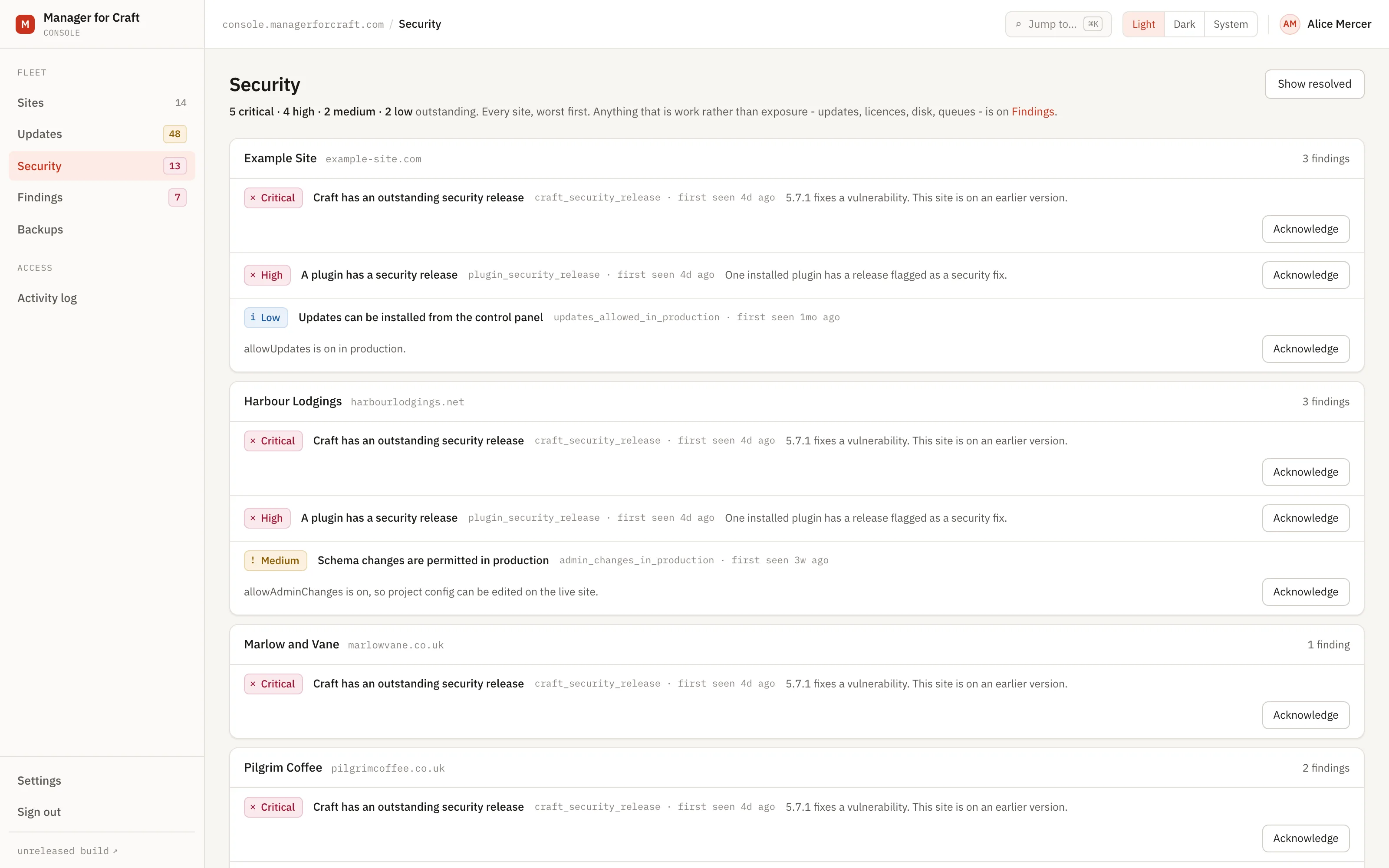
Exposure has a screen of its own, separate from work. Sixteen rules look for what somebody outside could act on, or already has, and each finding closes by itself the moment the next report or the next outside check shows it is gone.
Fourteen days, no card. Craft CMS 4.4 and later.
Forty sites produce more signal than anyone reads
Given enough sites, the information you need is always technically available somewhere. Dev mode is on in production. A certificate renewal did not happen. A .env file is answering over the web because a deployment put it in the wrong place.
None of it announces itself. It sits in a control panel nobody opened this month, or in a response header nobody has ever looked at, and it is found either deliberately or by an incident.
How security findings work
-
The site reports, and Manager looks from outside
Inventory hourly, updates daily, runtime every six hours, failed sign-ins every thirty minutes - all initiated by the site. Twice a day Manager adds what only an outsider can see: the TLS certificate, and what the site serves to the public.
-
Every security rule runs
Sixteen of them, each a small readable class in the public repository. They are the rules about exposure; the other thirteen are about work, and open on Findings.
-
Matching rules open a finding
With a severity from low to critical, the site it belongs to, and when it was first seen.
-
You are told about the ones that matter
A new finding can raise an email or a webhook, filtered by severity, so a low-severity notice does not wake anyone.
-
Fixing the site closes the finding
No one has to remember to tick it off. The next report or outside check that no longer matches the rule resolves it automatically.
-
What is left is ordered for you
Sites sort worst first, and within a site the findings sort by severity and then by how long they have been open.
Every rule, and what it opens
All of them run on every report, on both editions. Each one is a small readable class in the public repository, so you can check what opens a finding before you rely on it.
| Finding | Severity |
|---|---|
| Craft security release outstanding | Critical |
| No security key set | Critical |
| A file that should not be public is reachable | Critical if it holds a secret |
| Plugin security release outstanding | High |
| Dev mode on in production | High |
| HTTPS not enforced | High in production |
| Plain HTTP answered without redirecting | High in production |
| TLS certificate expiring or expired | High inside 7 days |
| TLS certificate not trusted | High if the name or chain is wrong |
| Repeated failed sign-ins | High if an administrator |
| Accounts locked out | Medium |
| Schema changes permitted in production | Medium |
| Security headers missing | Medium if all three are |
| Content Security Policy not enforced | Low |
| Software version announced in the response | Low |
| Updater enabled in production | Low |
A finding closes automatically when the next report no longer matches its rule.
The sixteen security rules
Severity is weighted, not counted
Twelve routine plugin updates never outrank one outstanding security release in the ordering - and they are not even on this screen, because they are work rather than exposure.
Two of these checks are made from outside
The TLS certificate at 05:00 and what the site serves to the public at 05:30. That is deliberate: a response header is added or removed by whatever serves the response, so a site whose CDN strips a header the application sets looks correct from inside and is not. It is the one class of check a plugin running on the site cannot get right.
Acknowledging is deliberate
You can acknowledge a finding you have decided to live with, and it takes a recent password confirmation. Reopening does too. Both are recorded.
Environment is respected
HTTPS not enforced is high on a production site and low on a development one. A staging site does not generate production urgency.
Failed sign-ins are counts, never identities
Four numbers and a timestamp: attempts in the last day, accounts affected, accounts locked out, and how many of those are administrators. No username, email address or IP exists in the schema.
Every rule is readable before you rely on it
Each one is a small class in the public repository, so you can check exactly what opens a finding rather than take the severity on trust.
The outcome
You open one list, ordered by exposure, and it is shorter than you expect because everything already fixed has closed itself. You find out about a renewal that did not happen four weeks before a visitor does, and about a file that should not be public the morning after it appeared.
Read how it works
The documentation lives in the public repository, next to the code it describes, and every page carries a link to edit it.
Related
-
The work every Craft site is quietly asking for
Thirteen rules for what is work rather than exposure: end-of-life PHP, licences, disk, queues, migrations.
-
Craft and plugin updates across every site
See what is outstanding on every site, and which of it is a security release, without opening a single control panel.
-
Alerts for the issues that need a person
Five events, by email or webhook, filtered by severity. Queued, so a slow endpoint never delays a site report.
See all your sites in about five minutes
Add a site, install the connector with Composer, paste the one-time code. The control panel updates within minutes. Fourteen days free, no card required, and nothing on your sites changes.
Craft CMS 4.4 and later