Backups
Encrypted Craft CMS database backups
Manager can ask a Craft site to back up its own database, on a daily or weekly schedule or on the day, encrypt the result on that server, and upload it to storage you control. It never holds a database password, and it cannot read the artefact it stores.
Fourteen days, no card. Craft CMS 4.4 and later.
The problem with backing up every client site
Most tools that back up a database for you need the credentials to reach it. That means every site you manage puts a working database password into a third party, and a breach of that third party is a breach of all of them at once.
The alternative is a per-site cron job writing to a bucket somewhere, which works until it stops working. A nightly dump that has been failing since Tuesday looks exactly like one that ran, because nothing reports on it.
How a backup runs
-
You authorise the site
Backups are off until an administrator turns them on for a named site. That takes a recent password confirmation, the site name typed out, an acknowledgement of what a database backup contains, and a reason that goes into the audit log.
-
You set a schedule, or ask on the day
Daily or weekly, per site, at an hour you choose in that site's own time zone. The scheduler runs hourly and decides site by site, so forty sites do not read forty databases at 03:00.
-
Manager queues a job with no parameters
The backup job carries no destination, no path and no command. There is nothing in it for an attacker to change, because there is nothing in it.
-
The site backs itself up
The connector asks Craft to run its own db/backup. No shell access, no mysqldump guesswork, no assumptions about where the database lives.
-
The dump is encrypted before it moves
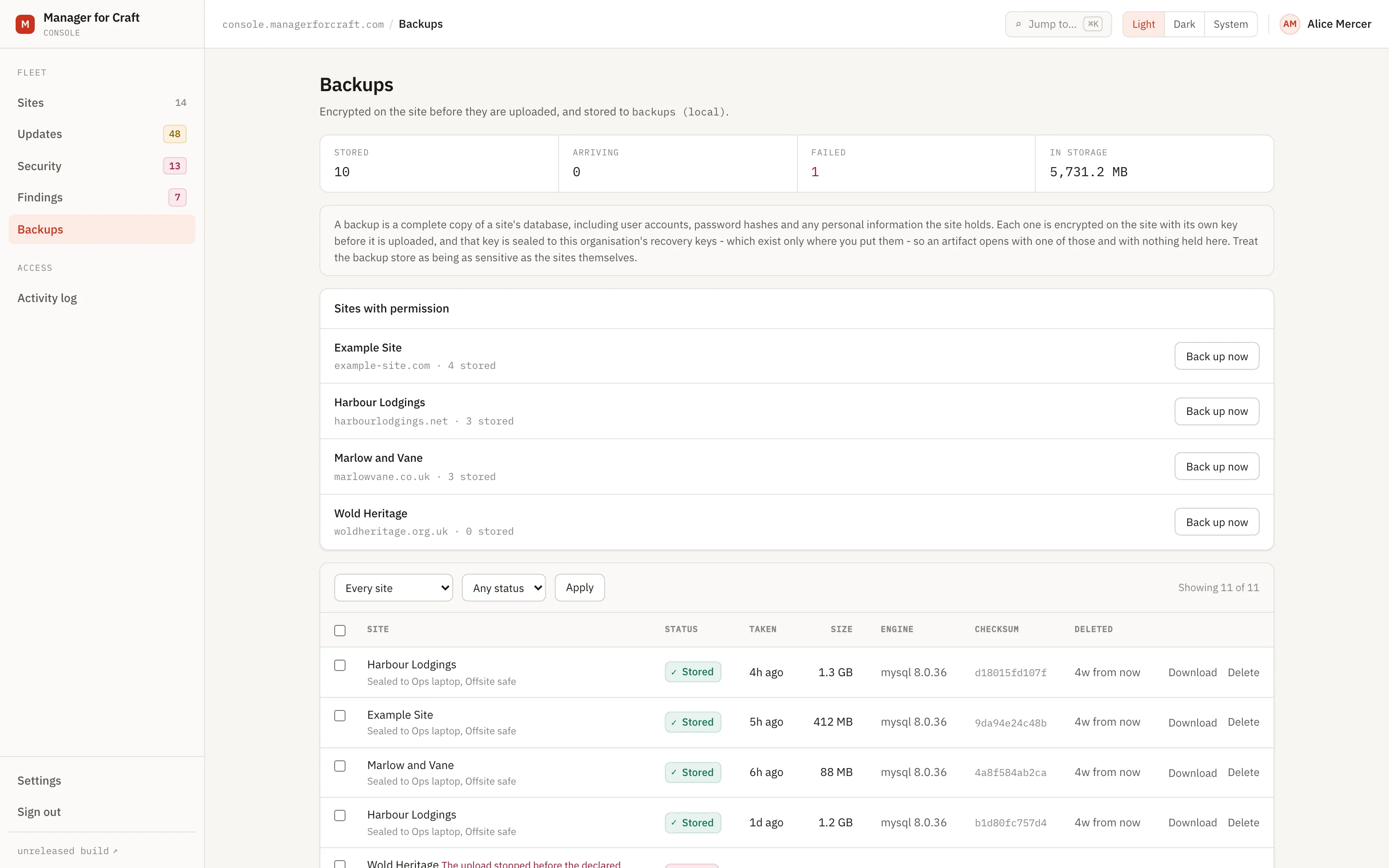
The connector generates a fresh key, encrypts the dump as an authenticated stream chunks, and seals that key to your recovery keys. Up to eight recipients, so more than one person can open it.
-
It is verified on arrival, then the plaintext goes
The connector states what it is about to send and signs that statement. Manager hashes the bytes as they arrive and keeps the artifact only if the two agree. Either way, succeeded or failed, the unencrypted file does not stay on your web server.
What protects the backup
No database credentials, anywhere
There is no column in the schema to put one in. A test walks the live database on every run to keep that true.
Recovery key pinning, which no control panel can undo
You pin the fingerprints of the keys allowed to receive a backup in config/manager-connector.php, in version control. The connector checks every key Manager offers against its own key material and refuses the whole backup before taking the dump if an unpinned key appears. It is a config file setting only, and a build check asserts it never reaches the settings template, so a hijacked control panel session cannot re-point your backups.
Retention by period, not by count
Everything from the last 30 days, then one a week for 4 weeks, then one a month for 12 months. Set per site, by an owner. Keeping the last N is the tempting version and it fails in the worst direction: a site producing bad backups nightly pushes out the last good one and the count never drops, so nothing looks wrong. Pruning runs at 03:30 and destroys the keys as well as the data, and you are never left with nothing.
A schedule that refuses rather than queues
If there is no active recovery key, no live connector, no granted capability, or a backup still outstanding for that site, the scheduler skips it and says so. A nightly failed job whose real cause is an unset key is worse than a clear refusal, and two concurrent dumps of one database is how a backup schedule becomes an outage.
Offline recovery
manager-restore is a separate MIT-licensed command line tool that opens no network sockets. It verifies, inspects and decrypts an artefact on a machine that has never spoken to Manager.
Download hands over ciphertext, and nothing else
You can take any stored artefact from the console exactly as it is held, still encrypted. Decrypting it happens on your machine, with the recovery key named on the row, because the secret half never comes to us. Nothing is decrypted through the browser: on a database of any size that would hold a worker against a timeout and could leave a half-written file that looks complete.
No restore button, on purpose
Manager cannot write to your site, so putting a backup back is your deliberate act rather than a button here. Restoring is not automated: it needs a confirmation flow and a tested recovery path of its own, and until those exist a restore button would be a way of pretending otherwise.
No size ceiling unless you set one
A database larger than two gigabytes used to be refused after it had been dumped and encrypted, because the wire format carried a limit nobody had chosen. It does not any more. Large artefacts upload in parts, and a ceiling exists only if an operator configures one, in which case the refusal names both the size and the setting.
The outcome
You get a backup of every managed site that you can open and nobody else can, taken by Craft itself, verified on arrival, and pruned on a schedule you set. Manager stores, verifies, serves and deletes something it cannot read.
Read how it works
The documentation lives in the public repository, next to the code it describes, and every page carries a link to edit it.
Related
-
Monitoring your Craft sites for exposure
Sixteen rules for exposure alone. Findings open with a severity, and close themselves when the site is fixed.
-
An append-only record of who changed what
Hash-chained and enforced by the database itself. Verified nightly, and it holds even against the account the application uses.
-
Know within fifteen minutes when a site stops reporting
Heartbeats every five minutes, TLS certificate expiry, disk space, response times and queue health.
See all your sites in about five minutes
Add a site, install the connector with Composer, paste the one-time code. The control panel updates within minutes. Fourteen days free, no card required, and nothing on your sites changes.
Craft CMS 4.4 and later